Saved Templates
A report template is a saved report configuration. Once you've built a report in the Report Builder, saving it as a template means you — or anyone else with access — can generate the same report again later, or pin it to a dashboard, without rebuilding it.
Saved templates live on the Reports page, reached from the avatar menu.
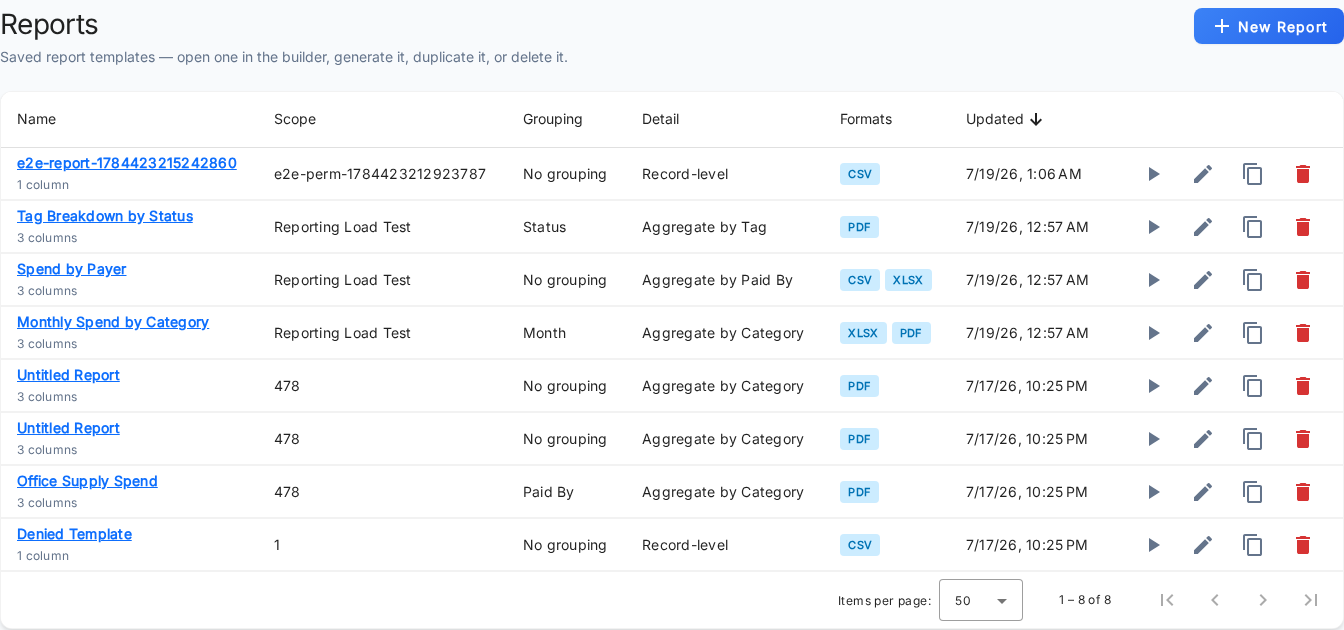
The templates list
The list shows the report templates you're allowed to see. Each row summarizes one template:
- Name — the template's name, with a count of how many columns it defines.
- Scope — the groups the report covers.
- Grouping — the grouping levels it uses.
- Detail — whether it lists individual records or aggregated totals.
- Formats — the output formats it produces, shown as chips.
- Updated — when it was last changed.
Sorting is available on Name and Updated; the columns derived from the saved configuration aren't sortable. When there are no templates yet, the list shows an empty state with a shortcut to build one.
The New Report button (top right) opens a blank builder. It appears only if your role lets you into
the builder — the Access Reports permission (app.reports.read).
Row actions
Each row offers actions on that template:
- Generate — run the template and download it, using the configuration and formats it was saved with.
- Open in builder — open the template in the Report Builder to review or change it. Editing a saved template updates it in place.
- Duplicate — make a copy you can modify independently.
- Delete — remove the template after a confirmation.
Which actions appear on a given row is decided by the server, per template. A row only shows the actions you're actually allowed to perform on that template — the list already folds in your application permissions, your access to the template's groups, and any per-template restrictions on your role. As a result, two people can see different action buttons on the same template.
For exactly how that per-template access is determined, and how to restrict a role to specific templates and actions, see Reporting permissions.